
All About LEDs
LEDs, or Light-Emitting Diodes, have come a long way since their early beginnings in the early 1900s. In 1907, it was discovered that applying voltage to silicon carbide produced a faint yellow glow—a phenomenon first observed by Henry Joseph Round.
Fun FactHenry Joseph Round’s discovery was accidental while experimenting with radio detectors — LEDs wouldn’t become practical until decades later.
Fast forward more than a century, and LEDs are everywhere: automobile headlights, smartphones, televisions, and—quite famously—game console modding. In the world of retro gaming, LEDs play a critical role in both functionality and aesthetics. Power indicators, disc activity lights, controller status LEDs, and backlit buttons all rely on LEDs to communicate what a system is doing at a glance.
As consoles aged and modding became more popular, LEDs evolved from simple status indicators into customization tools. Modders now replace dull or burned-out factory LEDs with brighter, more efficient alternatives, or swap colors entirely to match a custom theme. From the iconic red power LED on the original Nintendo Entertainment System to the status lights found on later disc-based consoles, LEDs have become a defining part of the console experience.
Understanding how LEDs work—and how to select the right one for the job—is essential for successful repairs and mods. Choosing the wrong color, voltage, or brightness can lead to dim lighting or uneven illumination.
The Basics
What exactly is an LED?
An LED is a type of diode that emits light when current flows through it in the forward direction. Light is produced as electrons move across the semiconductor junction and release energy as photons.
Colors and Wavelengths
Color is determined by wavelength and measured in nanometers (nm). Each color of visible light occupies a specific range on the electromagnetic spectrum, with shorter wavelengths producing cooler colors like blue and violet, and longer wavelengths producing warmer colors like red and infrared. In practical terms, this means the color of an LED is fixed by its internal materials and cannot be changed by adjusting voltage or current alone.
| Color | Approximate Wavelength (nm) |
|---|---|
| Infrared | 700 nm and above |
| Red | 650–680 nm |
| Orange | 600–640 nm |
| Yellow / Amber | 580–600 nm |
| Green | 520–550 nm |
| Cyan | 490–520 nm |
| Blue | 460–490 nm |
| Ultraviolet | 400 nm and below |
Let’s Get Physical
Types of LEDs
Through-Hole LEDs
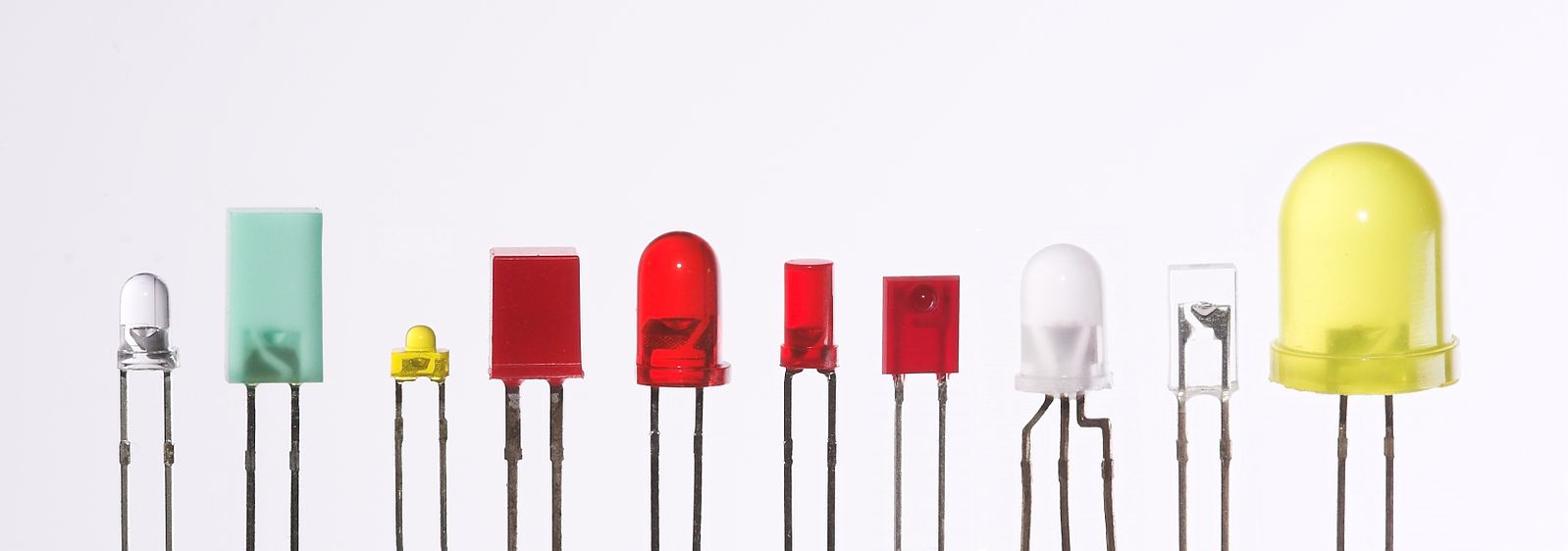
Through-hole LEDs are common in older consoles and many modern designs. Their leads pass through the PCB and are soldered on the reverse side, making them mechanically strong and easy to replace during repairs or modifications.
Knowledge is PowerThe longer lead on a through-hole LED is almost always the anode (positive).
Surface-Mount (SMD) LEDs
SMD LEDs are soldered directly to pads on the surface of the PCB and are smaller and more compact, which makes them common in modern consoles but slightly more challenging to replace without proper tools and technique.
LED Strips
LED strips are popular in console mods for indirect lighting and accents but are not factory-installed.
Heads up!:Many LED strips run at 12V. Connecting them directly to a console’s 5V rail may cause flickering or damage.
LED Sizes and Packages
LEDs come in many physical sizes and packages, and matching the original form factor is important for both fit and appearance. Common through-hole sizes include 3 mm and 5 mm LEDs, while surface-mount LEDs are available in a wide range of package types and dimensions.
When replacing an LED in a console, choosing the correct size ensures proper alignment with light pipes, front panels, and lenses. An LED that is too large or too small may not illuminate correctly or may not physically fit the original mounting location.
Current and Voltage
Most console LEDs operate at around 20 mA. Forward voltage varies by color. Applying too much current can destroy an LED instantly. Always use a current-limiting resistor.
| LED Color | Typical Forward Voltage (at ~20 mA) |
|---|---|
| Red | 1.8–2.0 V |
| Yellow / Orange | 2.0–2.2 V |
| Green / Blue / Cyan | 3.0–3.4 V |
| Ultraviolet | ~3.5 V |
Forward Voltage vs. Supply Voltage
An LED’s forward voltage is not the same as the voltage supplied by the circuit. The forward voltage is simply the amount of voltage the LED drops while operating, not the voltage it must be powered with directly.
In console circuits, LEDs are commonly powered from 3.3 V, 5 V, or 12 V rails, with a resistor used to drop the excess voltage and limit current. This is why a red LED with a forward voltage of around 2 V can safely operate in a 5 V system when paired with the correct resistor.
Misunderstanding this relationship is a common cause of failed LEDs in mods and repairs.
Diffused vs. Clear LEDs
Diffused LEDs feature a frosted or “milky” lens that spreads light more evenly across a wider viewing angle. This makes them ideal for front-panel indicators, light pipes, and situations where even illumination is more important than maximum brightness. Diffused LEDs help eliminate harsh hotspots and produce a softer, more uniform glow.
Clear (non-diffused) LEDs emit light in a more focused beam. When viewed straight on, they often appear brighter than diffused LEDs with the same electrical rating. However, their narrow viewing angle can cause uneven lighting or bright pinpoints, which may be undesirable in console indicator windows or internal lighting applications.
Choosing between diffused and clear LEDs is less about brightness alone and more about how the light needs to look in the finished installation.
Brightness
LED brightness is commonly measured in millicandela (mcd), which describes how intense the light appears in a specific direction. Higher mcd values generally indicate a brighter LED, but they do not tell the whole story when it comes to how an LED will look once installed in a game console.
Brightness is primarily controlled by current, not voltage. Increasing voltage without properly limiting current will not safely increase brightness and will almost always shorten the LED’s lifespan or destroy it outright. This is why resistors are critical in LED circuits—they allow brightness to be controlled safely and predictably.
Resistance Is Futile!
Why LEDs Need Resistors
LEDs do not self-regulate current. Without a resistor or other current-limiting device, they will draw as much current as the circuit allows, potentially stressing the LED or the console’s power circuitry and leading to premature failure.
Ohm’s Law is used to calculate how much resistance is needed to safely limit current through an LED. By relating voltage, current, and resistance, it allows you to choose a resistor that protects the LED while still providing the desired brightness. In console repairs and mods, applying Ohm’s Law ensures LEDs operate within safe limits and helps prevent long-term damage to both the component and the system.
Ohm’s Law: Voltage = Current × Resistance
Pro Tip:If your calculated resistor value falls between standard values, always round up to protect the LED.
Conclusion
With a basic understanding of LEDs, you can confidently install, replace, and modify lighting in game consoles without guesswork or unnecessary risk. Knowing how polarity, voltage, current, and brightness work together helps ensure reliable operation and long component life. Whether you’re restoring a console to factory condition or adding subtle custom touches, this knowledge allows you to make informed decisions and avoid common mistakes that can damage hardware or reduce reliability.

